public class BinarySearch {
public static void main(String[] args) {
int array[] = { 10, 20, 30 };
int ele = 30;
int index = pivotBinarySearch(array, ele, 0, array.length - 1);
System.out.println("index is " + index);
}
public static int pivotBinarySearch(int array[], int ele, int min, int max) {
int pivot = findPivot(array, 0, array.length - 1);
if (pivot == -1 || array[pivot] == ele)
return pivot;
if (array[min] > ele)
return binarySearch(array, ele, pivot + 1, max);
return binarySearch(array, ele, min, pivot - 1);
}
public static int binarySearch(int array[], int ele, int min, int max) {
int middle = (min + max) / 2;
if (ele == array[middle])
return middle;
if (min == max)
return -1;
if (ele < array[middle])
return binarySearch(array, ele, min, middle - 1);
return binarySearch(array, ele, middle + 1, max);
}
public static int findPivot(int array[], int min, int max) {
System.out.println(min + " " + max);
int middle = (min + max) / 2;
if (max - min == 1 && array[min] > array[max])
return min;
if (array[middle] > array[max])
return findPivot(array, middle, max);
if (array[min] > array[middle])
return findPivot(array, min, middle);
return -1;
}
}
|
Tuesday, 16 May 2017
1. Search element in rotated sorted array

Monday, 15 May 2017
2. Binary Search
1. What is Binary Search
- Given a sorted array arr[] of n elements, write a function to search a given element x in arr[].
- A simple approach is to do Linear search.
- The time complexity of above algorithm is O(n). Another approach to perform the same task is using Binary Search.
- Binary Search: Search a sorted array by repeatedly dividing the search interval in half.
- Begin with an interval covering the whole array.
- If the value of the search key is less than the item in the middle of the interval, narrow the interval to the lower half.
- Otherwise narrow it to the upper half.
- Repeatedly check until the value is found or the interval is empty.
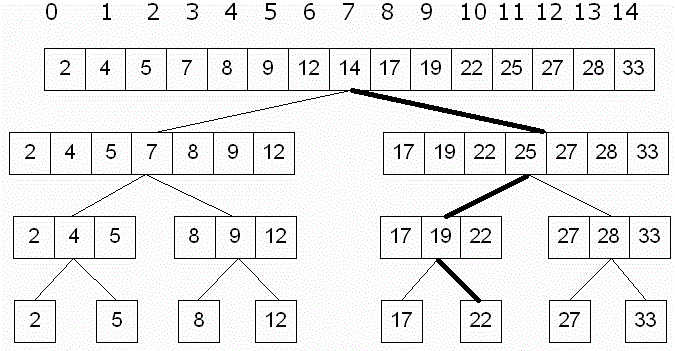
The time complexity of above algorithm is O(log n).
public class BinarySearch {
public static void main(String[] args) {
int array[] = { 0};
int ele = 10;
int index = binarySearch(array, ele, 0, array.length - 1);
System.out.println("index is " + index);
}
public static int binarySearch(int array[], int ele, int min, int max) {
if (max >= min) {
int middle = (min + max) / 2;
if (ele == array[middle])
return middle;
if (ele < array[middle])
return binarySearch(array, ele, min, middle - 1);
return binarySearch(array, ele, middle + 1, max);
}
return -1;
}
}
|
1. Linear Search
1. What is Linear Search
A simple approach is to do linear search, i.e
- Start from the leftmost element of arr[] and one by one compare x with each element of arr[]
- If x matches with an element, return the index.
- If x doesn’t match with any of elements, return -1.
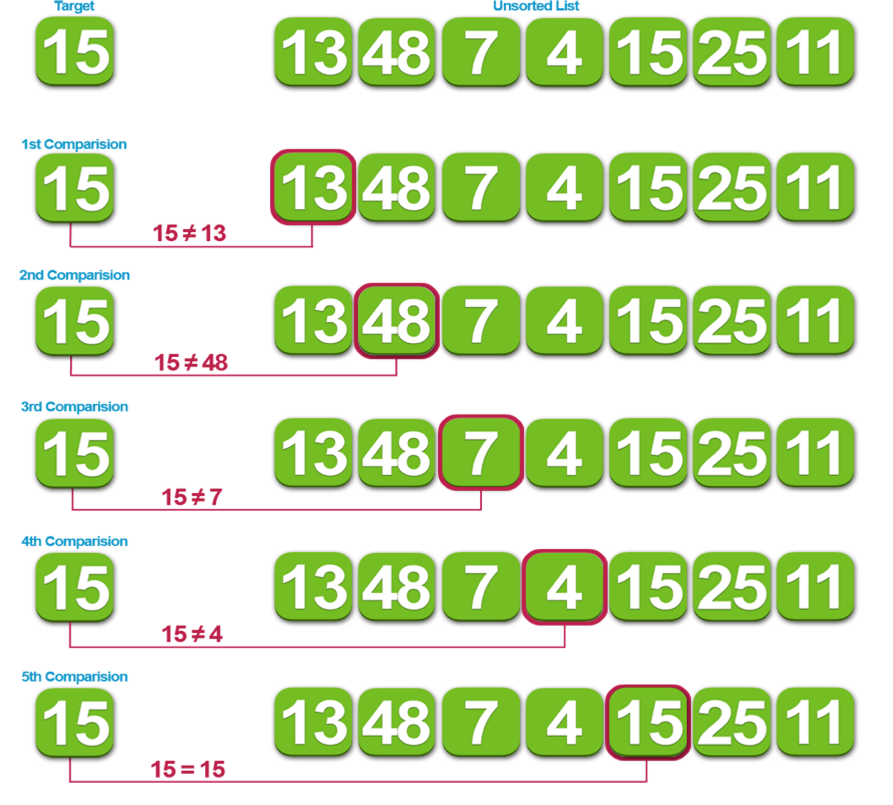
The time complexity of above algorithm is O(n).
public class LinearSearch {
public static void main(String[] args) {
int array[] = {13, 48, 7, 4, 15, 25, 11};
int ele = 25;
int index = linearSearch(array, ele);
System.out.println("index is "+index);
}
public static int linearSearch(int array[], int ele){
for(int i=0; i<array.length; i++){
if(array[i] == ele)
return i;
}
return -1;
}
}
|
27. Daemon thread and green thread
1. What is Daemon thread.
- The threads which are executing on background is called daemon threads
- Examples of daemon threads
- Garbage collector
- Signal dispatcher
- Attach listener
- Reference Handler
- Finalizer
- DestroyJavaVM
- The main objective of daemon thread is to provide support for non daemon threads (main-thread).
- If main thread runs with low memory then JVM runs garbage collector to destroy useless objects. So that number of bytes of free memory will be improved with this free memory main thread can continue its execution.
- Daemon threads are running with low priority normally, but if any need JVM will increase priority.
- Usually daemon thread having low priority but based on requirement, daemon threads can run with high priority also.
- Methods related to daemon thread in Thread class
- Public boolean isDaemon()
- Public void setDaemon(Boolean b)
- We can check daemon nature of a thread by using isDaemon() of Thread class.
- We can change daemon nature of a thread by using setDaemon(..).
- Changing daemon nature is possible before starting of a thread only.
- After starting a thread if we are trying to change daemon nature then we will De get runtime exception “IllegalThreadStateException”.
- By default main thread is always non daemon and for all remaining threads daemon nature will be inherited from parent to child.
- If parent thread is daemon then automatically child thread is also daemon.
- If parent thread is non daemon then automatically child thread is also non daemon.
2. Is possible to change daemon nature of Main thread.
- No, it is impossible to change daemon nature of main thread because it is already started by JVM at beginning.
- We can change daemon nature for threads created by us , before start.
Class X{
public synchronized void m1(){
sop(Thread.currentThread().isDaemon());//false
Thread.currentThread().setPriority(true);//exception
MyThread t1 = new MyThread();
Sop(t1.isDaemon());//false
T1.setDaemon(true);
Sop(t1.isDaemon());//true
}
}
|
3. Life of daemon thread.
- Whenever last non daemon thread completes its execution, then automatically all daemon threads are terminated its execution irrespective their position.
Class MyThread extends Thread{
Public void run(){
For(int i = 0; i<10; i++){
Sop(“child thread”+i);
Thread.sleep(2000l);
}
}
}
Class MainDemo{
public static void main(String[] args)throws Exception{
MyThread thread1 = new MyThread(d,”Rama”);
thread1.setDaemon(true);
thread1.start();
Sop(“main thread end”);
}
}
|
Output(based on jvm it will change)
|
child thread 1
|
main thread end
|
Note : In above example, main thread is non daemon and child thread is daemon hence whenever main thread terminates automatically child thread will be terminated, in this case output is end of main thread followed by child thread or end of main thread directly.
4. What is green thread.
- Java multithreading concept is implemented by using the following 2 models
- Green Thread model
- Native OS model
- The thread which is managed completely by JVM without taking underlying OS support is called Green Thread.
- Very few operating systems like Sun Salaries provide support for green thread.
- Any way Green thread model is deprecated
5. What is Native OS model in thread.
- The thread which is managed by JVM with the help of underlying OS, is called native OS model.
- All windows based OS provide support for native OS model.
Subscribe to:
Posts (Atom)
-
Analysis of Algorithms Q) What is an Algorithm? · An algorithm is the step by step instructions to solve a given problem. ·...
-
1. What is a Functional Programing? Characteristics of FP Function Closure Support. Higher-order functions Use of recursion...
-
1. Producer consumer problem. In computing, the producer–consumer problem (also known as the bounded-buffer problem) is a classic examp...


